My colleague Susan and I have been teaching a lot of eReader workshops for librarians lately and every time someone manages to ask us a question we haven’t yet encountered. This last trip one of the students brought in a Sylvania 7” Mini Tablet and asked if we knew how to get the OverDrive Media Console onto it so she could check out library eBooks. Well, the simple answer was to download OMC from the Android Market. Trouble is, the Android Market is not available on this particular Android tablet. (If there’s a good reason for this I’ve not bothered to find it.) So off I went searching and I was able to figure out that OverDrive does support a non-market install of OMC but doesn’t exactly supply any instructions that are good to anyone without some significant Android experience. So, here are my version of those instructions.
Please note: Your screenshots may vary from mine as I’m using the CM7 version of Android and the Dolphin Browser but the directions should be accurate enough for any other version of Android.
Stage one is to allow non-market installations on your Android device. Open your app drawer and access the Android settings.

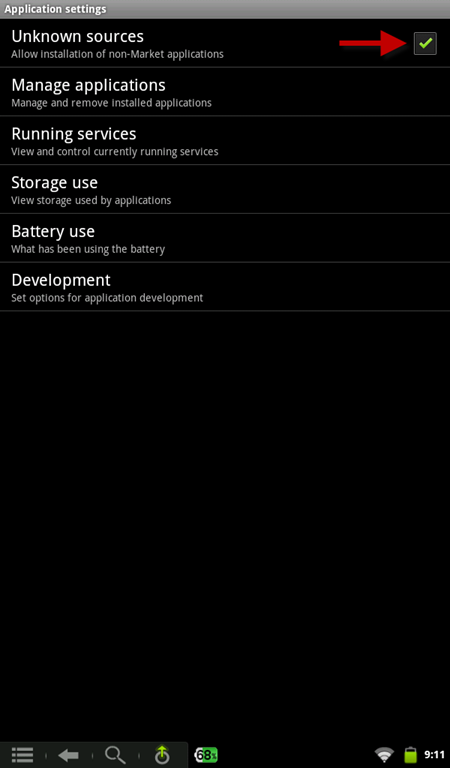
Select Applications.

Check “Unknown Sources”. You may receive a warning that this potentially makes your device less secure and that you must confirm this setting. While this is technically accurate I can say that I’ve done this on all of my Android devices and have yet to have any problems. If you’re uncomfortable with checking this option you can come back and uncheck it once you’ve installed OMC.
This completes stage one. For stage two open your device’s browser and go to http://www.overdrive.com/software/omc/. The site should automatically detect you’re using an Android device and only offer you the Android download. Do not click on the Android market. Instead look for the following text: “If your device doesn’t support Android Market, you can download OverDrive Media Console for Android from OverDrive.” Click that link.

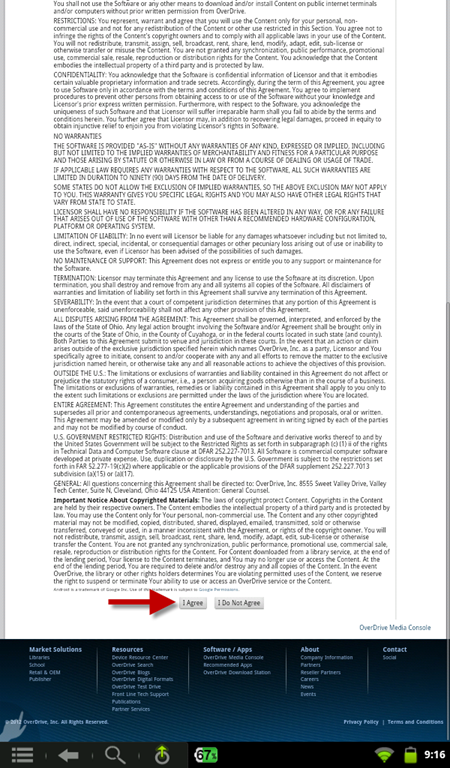
Next you’ll see a very long EULA. Scroll to the bottom and click the “I Agree” button.
The download process will begin and you’ll be asked to save the file “ODMediaConsoleSetup.apk”. Click the OK button to do so. This is the installation file for OMC.

Next open the browser’s menu and look for “Downloads”. On my browser I had to select “more” before I say the Downloads option. Click “Downloads”.

Find the ODMediaConsoleSetup.apk file in your downloads list and tap it to start the install process. You will most likely be asked to confirm the installation. Do so.

At this point you should now have the OverDrive Media Console app installed on your Android device. There are however, a few things to keep in mind.
First, as mentioned previously, if you’re uncomfortable with the “Unknown Sources” option being checked, you may return to that setting at this time and uncheck it.
Second, and more importantly, since this app was not installed through the Android Market it will not alert you to updates. From this point forward you’ll be responsible for manually updating the app as needed. Should a new version of the app be released you will need to repeat this process in order to install the update.

Thanks; while this is probably a pretty rare circumstance, I’m saving the link to this post just in case.
I found these instructions unbelievably useful- saved what could easily have been many frustrating hours. Thank you!