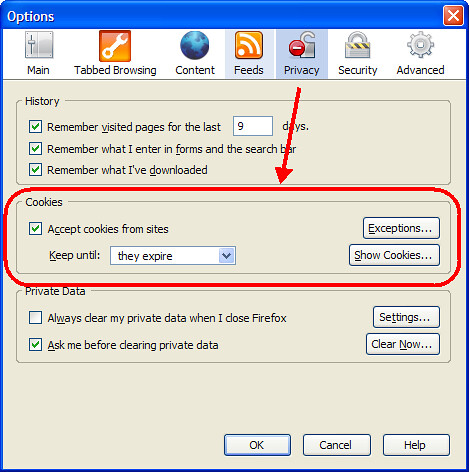
I was just listening to the latest episode of Security Now! in which it was pointed out that the new Firefox 2.0 does not have an option for automatically blocking third-party (i.e. advertisers) cookies. Looking at the Privacy options screen I was quickly able to confirm this.
However, you can still do this but you must edit the setting manually. Here’s how to do this in a few simple, illustrated steps.
First, type about:config in the address bar and then type cookie into the Filter: field. Find the line titled network.cookie.cookieBehavior, right click on it, and select Modify.
In the Enter integer value box, replace the number 0 with the number 1 and click OK.
When done, the network.cookie.cookieBehavior line will be bold, the Status will be listed as “user set” and the value will be “1”. You are now blocking all third-party cookies.
Michael Sauers is the Director of Logan Library in Logan, UT. Prior to this he was one of the founding staff and Technology Manager for Do Space in Omaha, NE. After earning his MLS in 1995 from the University at Albany's School of Information Science and Policy Michael spent his first 20 years as a librarian training other librarians in technology along with time as a public library trustee, a bookstore manager for a library friends group, a reference librarian, a technology consultant, and a bookseller. He has written dozens of articles for various journals and magazines and has published 14 books ranging from library technology, blogging, Web design, and an index to a popular horror magazine. In his spare time, he blogs at TravelinLibrarian.info, runs The Collector's Guide to Dean Koontz website at CollectingKoontz.com, takes many, many photos, and typically reads more than 100 books a year.
Unless otherwise stated, all opinions are my own and are not to be considered those of the City of Logan, UT.
View all posts by Michael Sauers
2 Replies to “Cookie Handling Problem in Firefox 2.0”
Thank you. It’s stuff like this that keeps me reading your blog.
I just got around to listening to that episode of Security Now! and found your site via google. Simple to do, with your help. Thanks!


Thank you. It’s stuff like this that keeps me reading your blog.
I just got around to listening to that episode of Security Now! and found your site via google. Simple to do, with your help. Thanks!