Well, I’ve just found out that I Michael Porter needs to update my his flickr presentation for IL2006 and I need to update my non-IL2006 flickr presentations… You can now geotag your images! Through flickr’s slick “organize” interface, you can now drag your photos onto a map (Yahoo! of course) and link them geographically.
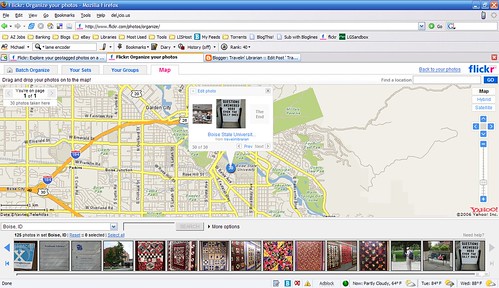
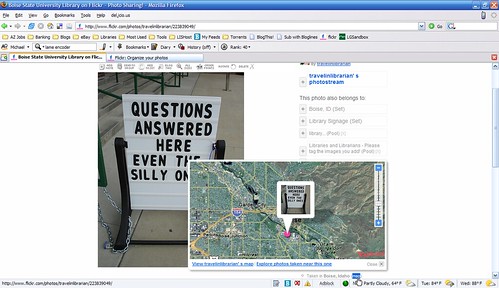
Now you’ll see a new “map” link on photo pages (for which the photographer has done this) and you’ll be able to pull up a map of the location the photo was taken.
From there, you can explore the photographer’s other photos based on their location. (The image shows that I’ve geotagged 30 photos in the Boise area (all on the BSU campus actually) and two in Aurora, CO (both from when I went grocery shopping this afternoon.)
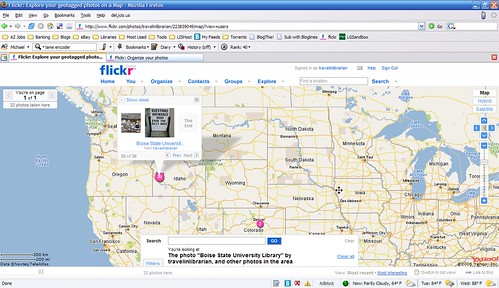
The only problem I see with the interface at this point is the low level of searchability. I put in the address for the Albertson Library on the BSU campus, and the best result was “Boise, ID”. From there I could cross reference with Google Maps to find a more accurate point to places my photos on but I’d have preferred flickr take me to the exact location I needed.
I’m not planning on going back and geotagging 2000+ photos but I’m planning on taking advantage of this feature as I add more photos to my account.

Hey, watch it buddy! I’m doing the “fun”ctional and community bits for the first 15-20 mins, you’re doing the ten mintue fun tools wrap up at the end!
btw, I just got the Flickr stuff from Fiona and the Nat. Library of Australia folsk it is FABULOUS! This just is gonna be the cooolest group presentation! Fun, fun, fun! Cool, cool, cool!
-Michael Porter
Thanks for shout out, Michael!
Thanks for including the screen shots. Very cool! I can already think of some good library promo uses.